Re-lettering every language
Every translation needs its own lettering pass. You resize balloons, fix line breaks and check the page again. Change the artwork and you may have to do it all over.
Draw, ink, color and letter in one studio. Take the same book through translation, print and digital delivery without making it all over again.
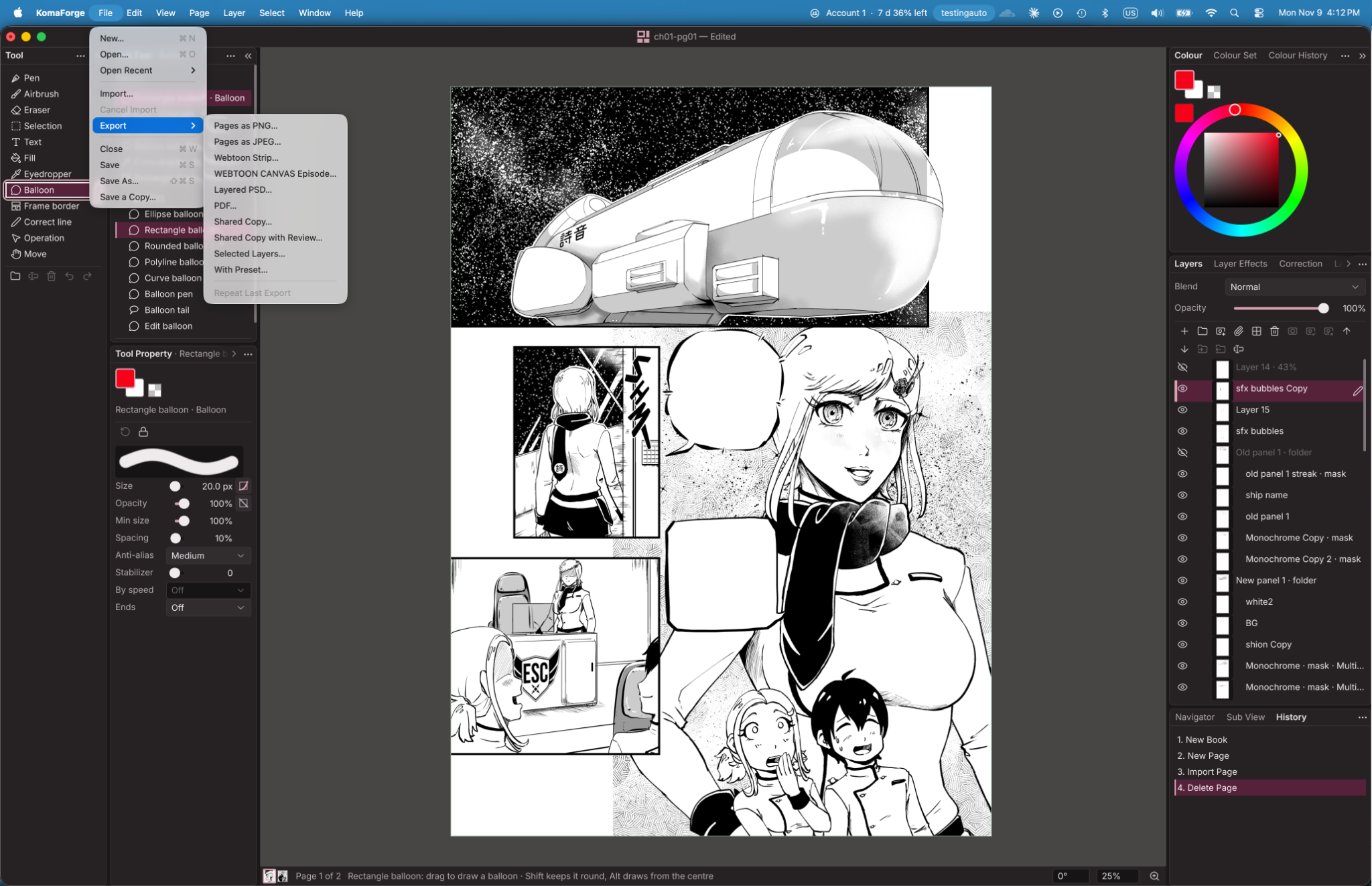
Here's KomaForge in development: a page on the canvas, with the drawing tools, balloons, layers and export options around it.
 VIEW ORIGINAL
You finished the page. You shouldn't have to rebuild it just to ship it.
Every translation needs its own lettering pass. You resize balloons, fix line breaks and check the page again. Change the artwork and you may have to do it all over.
Every platform and buyer asks for different widths, slice heights, layers and file names. It's the same episode, but you're preparing it again for each destination.
Moving from magazine pages to a volume or trade paperback means recalculating spine width, bleed, cover wraps and gutters. Usually by hand.
Keep typing. The balloon grows with the dialogue, the lines settle into shape, and the tail stays attached to the speaker. Change your Shout style once; every shout in the book updates.
Join balloons or split them apart. Layer strokes and fills on captions and sound effects. Curve or warp the lettering and keep it editable.
One set of artwork; separate text, balloons, fonts and sound effects for each language. Fix the art once and every edition gets the change. Edit a line in English and KomaForge flags the translations that need another look.
Write vertical Japanese with ruby. Handle Korean and Chinese line breaks properly. Give every character their own voice in every language, and choose whether to keep, overlay or redraw each sound effect.
Choose a trim size and binding. KomaForge calculates the spine width as your page count changes, sizes the cover wrap and sets black lettering to overprint. Run a preflight check before sending the files to press.
Turn a magazine chapter into a pocket volume, trade paperback, scrolling webtoon or panel-by-panel phone edition. Panels reflow and balloons resize, but your manual adjustments stay where you put them.
Choose a delivery preset for each platform or buyer: width, slice height, layer structure and file names. Export checked, correctly sliced episodes from your full-resolution master. If a strip is too tall for PSD, split it or use PSB.
Open CLIP and PSD projects, and export PSDs with editable type, live layer styles and smart objects. When a collaborator sends a file back, compare their changes and accept or reject them. A watched folder lets teammates keep working in their usual apps.
Pin comments to individual balloons, add redlines that won't print, compare versions side by side and track text edits in every edition. Each person works on their own layers, with sign-off required before anything goes to print.
Keep names, places and made-up terms in a glossary, with approved spellings for each language. Add character voice notes and honorific rules. Proofing checks the script against them so mistakes get caught before release.
Keep a page-by-page record of edits and where they came from. You can show which parts are your own work and how the page changed.
Designed for volumes of 1,000 pages and webtoon strips 300,000 pixels tall. Open one page at a time and save only the parts you've changed.
Already working in CLIP STUDIO PAINT or Photoshop? Bring your .clip and .psd files into KomaForge, then export back to those formats when you need to hand work off. You keep the files and the workflow you know.
Everything you do in the interface can run from the command line too. Script your exports, run batches overnight, or add it to your studio pipeline—even offline. Keep drawing while the repetitive stuff gets done.
$ comic import chapter-07.cmc --book ./my-series$ comic run ./my-series --commands fixes.jsonl --dry-run$ comic render ./my-series --page 12 --scale 0.25 --out p12.png$ comic export ./my-series --edition ja --profile trade-6x9 --format pdfx4$ comic validate ./deliveryThe app and your scripts use the same commands. If you can do something by clicking, you can put it in a script too.
Run a batch in preview mode first. See which pages and files will change, along with a render, before saving anything.
A batch either finishes completely or makes no changes. Undo the whole job in one step; running it again won't duplicate the edits.
Use the same inputs and get the same files back, even months later. If a job fails, the error tells you what happened and where to look.
Queue exports for every language and platform, then validate the delivery files in the same job. Check progress or cancel it when you need to.
KomaForge can spot the steps you keep taking on every page and suggest a recipe. Run it again from the app or the command line.
Most comic workflows send you between apps to draw, letter, resize and deliver. KomaForge keeps the book together, from rough pencils to finished files.
Based on Clip Studio Paint 5.1, Photoshop 2026 and Illustrator 2026 as of November 2026. All product names are trademarks of their owners.
Draw with pressure- and tilt-sensitive pens and brushes. Erase vector lines cleanly back to the nearest intersection. Use perspective, speed-line and focus-line rulers, cut panel borders in one stroke, control screentone dots, and pose 3D figures for reference.
Coming to Windows, Mac, Linux, iPad, and Android.
We're building KomaForge with working comic creators and studios. Bring a chapter to the pilot. Show us what gets in your way. Help us make it better.


